Policies & modes
CruiseKube separates observation from enforcement using per-workload settings. The Policies & Configuration screen is where most teams set mode, eviction priority, and related behavior (see Dashboard).
Optimization modes
| Mode | Behavior (intent) |
|---|---|
| Recommend | CruiseKube computes recommendations and shows them in the dashboard; it does not apply in-place resource changes for that workload. |
| Cruise | CruiseKube applies optimizations for that workload according to controller schedules, admission webhook behavior, and safety rules. |
Exact labels can vary slightly by release; trust what you see in your deployed frontend.
Rolling out changes safely
Typical progression:
- Install and let stats / metrics tasks populate the database.
- Keep workloads on Recommend until recommendations look credible for your SLOs.
- Move cohorts to Cruise in stages (namespace-by-namespace or tier-by-tier).
flowchart TD
  subgraph observe[Observe]
    S[Stats + metrics tasks]
    R[Dashboard — Recommend mode]
  end
  subgraph enforce[Enforce]
    A[Runtime optimizer]
    W[Admission webhook]
  end
  S --> R
  R -->|Validated| C[Cruise mode per workload]
  C --> A
  C --> W
Memory-specific behavior can still be gated at deploy time with CRUISEKUBE_RECOMMENDATIONSETTINGS_DISABLEMEMORYAPPLICATION (controller and webhook) if you want CPU-only automation first—see Configuration and values.yaml.
Eviction Criticality/Priority (when the math does not fit)
On a crowded node, the runtime optimizer may need to evict lower-priority pods so the remaining set can be sized safely. Ordering is documented in depth under Workload Criticality; summary:
| Level | Typical use |
|---|---|
| Low | Default for many stateless replicas—evicted first. |
| Medium | Default bias for single-replica or StatefulSet workloads. |
| High | Evicted only when necessary after lower tiers. |
| Very-High | Never evicted by CruiseKube for optimization pressure. |
| DaemonSets | Always protected. |
Pair this with your PDBs and SLOs—CruiseKube does not replace Kubernetes disruption controls.
Namespace and workload exclusions
The Helm chart supports webhook namespace exclusions (e.g. system namespaces). Workloads can also be disabled via overrides / annotations depending on version—validate in your cluster if recommendations never appear for a subset of pods.
Disruption windows and operational tasks
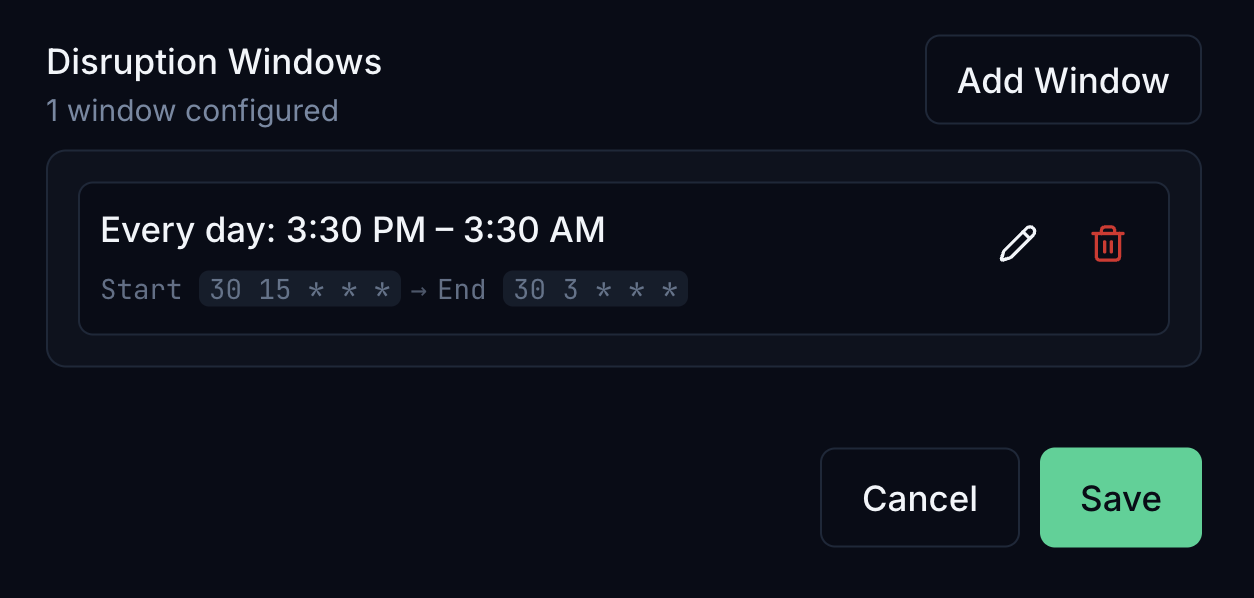 Releases have introduced disruption windows and related controller tasks so optimization can respect maintenance hours. If your version includes these APIs, treat them as the bridge between aggressive savings and change risk. In the dashboard you can define windows with a visual builder (timezone, days, start/end time); schedules are stored as cron expressions, with local time summarized alongside the UTC values used by the controller.
Details also live in release notes and Helm values—search DISRUPTION / disruption in values.yaml.
Cost views vs policy
Policies & modes control whether and how resources change. Dollar estimates use separate unit pricing assumptions—see Resource pricing.