Kubernetes-native rightsizing · Open source
Stop paying for capacity your pods never use.
CruiseKube uses the CPU and memory metrics you already collect to lower request overhead workload by workload—and gives Karpenter room to consolidate nodes. Platform teams cut ~50% of request overhead — without rewriting manifests by hand or flipping a cluster-wide switch.
Installs in 5 minutes Runs in your cluster Secure — in-cluster only
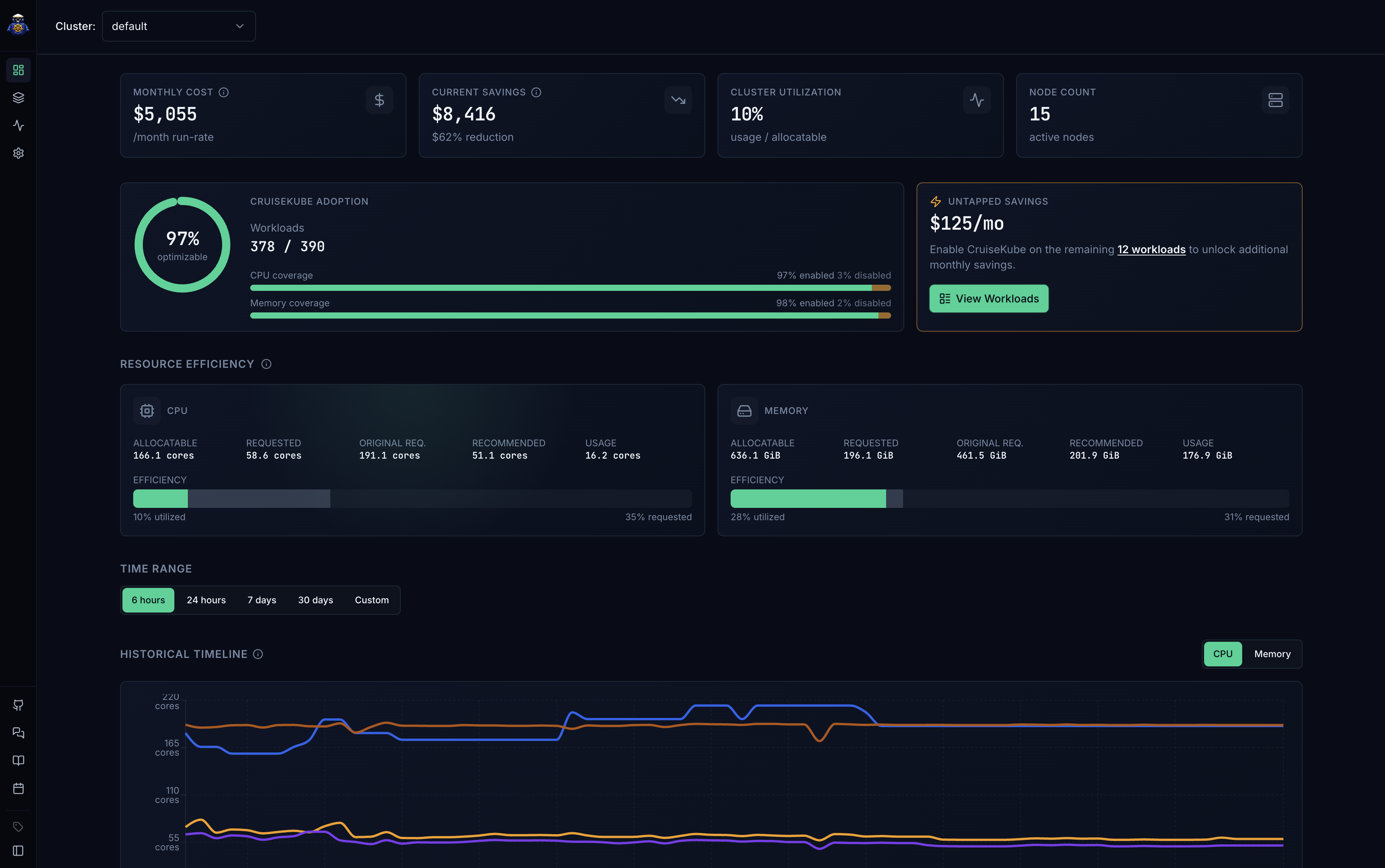
Built for both sides of the table
DevOps owns the cluster. FinOps owns the bill. CruiseKube gives both a single source of truth.
Stop being the human autoscaler
No more chasing teams to tune requests after every OOM kill. CruiseKube proposes per-workload numbers grounded in Prometheus data — you keep the guardrails, the audit trail, and the kill switch.
- Per-workload Recommend / Cruise modes — promote when ready
- Disruption windows so changes never land mid-launch
- Critical tiers protect system pods from eviction
- Open source — runs in-cluster, no agent calling home
Savings you can put on a slide
Stop arguing about cluster waste from screenshots. CruiseKube quantifies idle CPU and memory per workload, attributes it to the owning team, and logs every applied change as a structured event.
- Net $/month savings rolled up per workload and namespace
- Configurable CPU and memory pricing for accurate cost math
- Adoption view: who's on Recommend vs Cruise vs Off
- Receipts for finance — every change captured as an event
Features
From metrics to right-sized requests—and the controls to run it in production
Proposed requests from Prometheus, per-workload Recommend and Cruise modes, policies you can stand behind, and full visibility when numbers change.
Observe
Grounded in Prometheus
CPU and memory recommendations from the time series you already scrape—aligned with how each pod actually behaves.
Recommend
Review before anything changes
Proposals land in the UI. Nothing touches your manifests until you accept them—no blind fleet-wide resize.
Cruise
Automate per workload
Switch only the workloads you trust to Cruise—scoped automation with intent, not a cluster-wide toggle.
Workload-level
Every Deployment gets its own verdict
Savings, mode, and filters are scoped to the workloads you run—not a single cluster KPI nobody owns.
Policies
Guardrails on every change
Policies cap how aggressive each adjustment can be—enough to cut waste, small enough to trust in production.
Audit trail
Events that answer “what changed—and when?”
Applied recommendations show up as a living log—no reconstructing history from kubectl and Slack threads.
Disruption windows
Optimize on your quiet hours
Cron-friendly schedules define when it is safe to move numbers—including workloads that cannot shift during peak.
Monitoring
One dashboard for adoption and waste
Roll-up views tie cost signals, efficiency, and who is on Recommend vs Cruise—so platform reviews start aligned.
Outcome
Less unused reservation
Lower request overhead and fewer nodes held for headroom you rarely use—without sacrificing observability or control.
< 5 min
from helm install to insight
Connect your Prometheus and see first recommendations in under five minutes.
~50%
less request overhead
Less CPU and memory reserved on production workloads once Cruise is enabled.
~90%
less optimization toil
Automate cluster tuning—skip spreadsheets, rollouts, and manual request chasing.
Get started
One Helm command. First recommendation before you finish standup.
- Needs only Prometheus — no vendor lock-in
- First recommendations in under 5 minutes
- Open source — runs entirely in your cluster
helm install cruisekube \
  oci://tfy.jfrog.io/tfy-helm/cruisekube \
  --namespace cruisekube-system \
  --create-namespace \
  --set cruisekubeController.env.\
CRUISEKUBE_DEPENDENCIES_INCLUSTER_PROMETHEUSURL=\
"http://prometheus-kube-prometheus-prometheus.monitoring.svc:9090"

✓ Release "cruisekube" installed successfully
Get involved